 Skip to content

7 Simple Hand Exercises to Relieve Stiffness After Desk Work
If you spend much of your working day typing, scrolling or using a computer mouse, your hands and wrists can begin to feel tired, stiff and uncomfortable. Although these movements rarely feel particularly demanding, repeating them for hours without sufficient breaks can contribute to muscular fatigue and discomfort.
Our hands are involved in almost everything we do, yet they’re often overlooked when it comes to everyday wellbeing. We might stretch our backs after sitting at a desk or take a short walk to ease tired legs, but how often do we give our fingers, palms and wrists the same attention?
The good news is that a few gentle hand exercises for desk workers can help maintain flexibility, encourage comfortable movement and provide a welcome break from repetitive tasks.
You don’t need specialist equipment or a complicated routine. These seven simple exercises can be performed at your desk or during a short break, making them easy to incorporate into your working day.
1. Gentle Finger Stretches to Ease Stiffness
Typing and using a mouse can involve holding your fingers in similar positions for extended periods. Occasionally moving them through a comfortable range of motion can help relieve that feeling of stiffness.
Start by placing one hand in front of you with your palm facing upwards.
Using your opposite hand, gently guide one finger backwards until you feel a mild stretch. Hold for approximately five seconds before releasing.

Repeat with each finger, taking care not to pull or force the joints beyond their comfortable range.
The stretch should feel gentle rather than painful.
You can also spread your fingers apart, hold the position briefly and then relax them.
Why try it? Gentle finger stretches can help maintain joint mobility and provide a welcome change from the repetitive movements involved in typing.
2. Wrist Circles to Encourage Comfortable Movement
Your wrists are involved in countless everyday activities, from operating a computer mouse to holding a smartphone.
If they feel stiff after prolonged desk work, slow wrist movements can provide a useful break.
Rest your forearms comfortably on your thighs or desk, allowing your hands to move freely.
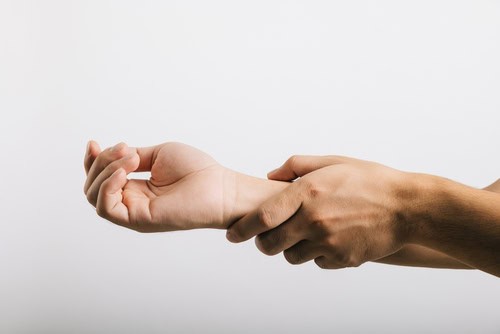
Slowly rotate your wrists in small circles, making five movements in one direction before reversing.
Keep the movement controlled and avoid pushing into discomfort.
You can also gently move your wrists upwards and downwards within a comfortable range.
Why try it? Wrist circles help move the joints through different positions and may ease feelings of stiffness after remaining in one posture for too long.
3. Open and Close Your Hands
One of the simplest hand exercises is also one of the easiest to perform throughout the day.
Begin with your hands relaxed.
Slowly curl your fingers into a loose fist, keeping your thumb resting comfortably outside your fingers rather than squeezing tightly.
Hold briefly before opening your hand and spreading your fingers apart.
Repeat five to ten times.
This exercise can be particularly convenient between emails, meetings or other computer-based tasks.
Why try it? Opening and closing your hands gently moves the finger joints and allows the muscles involved in gripping and typing to work through a different range of motion.
4. Stretch Your Forearms After Typing
Discomfort associated with prolonged computer work isn’t always limited to the hands themselves.
Muscles in the forearms help control movement of the wrists and fingers, so gentle forearm stretches can be a useful addition to a desk-based mobility routine.
Extend one arm in front of you with your elbow comfortably straight and palm facing upwards.
Using your opposite hand, gently guide your fingers towards the floor until you feel a mild stretch along the inside of your forearm.
Hold for around ten seconds before releasing.
Next, turn your palm downwards and gently guide your hand towards the floor to stretch the opposite side of the forearm.
Repeat on your other arm.
Avoid locking your elbow or forcing your wrist into an uncomfortable position.
Why try it? These movements gently lengthen the forearm muscles and can provide relief from the sensation of tightness that sometimes develops during repetitive tasks.
5. Try a Relaxing Hand Massage
A simple hand massage can be an enjoyable way to unwind after a demanding working day.
Apply a small amount of hand cream or moisturiser to your palms and rub your hands together to distribute it evenly.
Using your thumb, make gentle circular movements across the fleshy areas of your opposite palm.
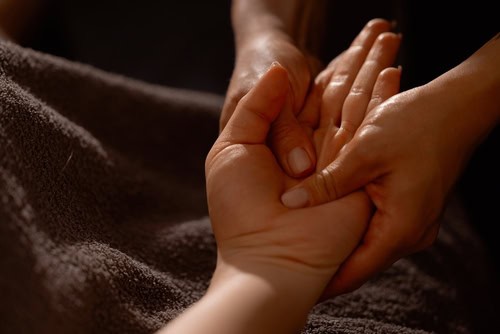
Gradually work towards the base of each finger, applying light, comfortable pressure.
You can also gently massage the muscles around the base of your thumb, an area that may feel tired after prolonged gripping or smartphone use.
Spend approximately one minute on each hand.
Avoid pressing deeply into painful areas or directly onto irritated joints.
Why try it? Gentle massage may provide temporary comfort and relaxation, while moisturising helps maintain the skin’s softness and hydration.
For people who wash their hands frequently or work in dry indoor environments, regular hand moisturising can be particularly beneficial.
6. Practise Gentle Finger and Thumb Touches
Finger coordination is an important part of everyday hand function, and this simple movement can be performed almost anywhere.
Hold one hand comfortably in front of you.
Touch the tip of your thumb to the tip of your index finger, creating a small circle.
Release and repeat with your middle finger, ring finger and little finger.

Move slowly and try to keep the rest of your hand relaxed.
Repeat the sequence several times before changing hands.
If you find the movement difficult, slow down rather than forcing your fingers into position.
Why try it? This exercise encourages controlled movement of the fingers and thumb, helping maintain dexterity and awareness of hand positioning.
7. Give Your Hands a Proper Break
Sometimes the most useful thing you can do for tired hands is stop using them in the same way for a few minutes.
Short, regular breaks can help interrupt long periods of repetitive activity and static positioning.
Stand up, stretch your arms, walk around the room or complete a task that doesn’t involve typing or gripping a mouse.
If you’re working on a lengthy project, consider alternating between computer-based activities and tasks that require different movements.
It’s also worth checking your workstation.
Keep your keyboard and mouse within easy reach, avoid unnecessarily bending your wrists upwards and ensure your shoulders remain relaxed.
A mouse that feels uncomfortable to grip or a keyboard positioned too far away may encourage awkward postures.
Why try it? Changing position and varying tasks can reduce prolonged strain on the same muscles and help make computer work more comfortable.
How Often Should You Do Hand Exercises?
There is no single exercise schedule that suits everyone.
If your hands feel comfortable and you don’t have an existing medical condition, a few gentle movements during regular work breaks may be sufficient.
You could begin with a short routine:
- Five gentle wrist circles in each direction.
- Five repetitions of opening and closing your hands.
- A brief finger stretch on each hand.
- Ten seconds of comfortable forearm stretching.
- A minute of gentle hand massage at the end of the day.
The entire routine takes only a few minutes.
Remember that these movements shouldn’t cause pain. If an exercise increases discomfort, stop and avoid forcing the movement.
Consistency is generally more useful than performing long or demanding stretching sessions.
Everyday Habits That Can Help Prevent Hand Discomfort
Hand exercises are only one part of looking after your hands and wrists.
A few adjustments to your daily routine can also make a difference.
Review your desk setup. Position your keyboard and mouse so your wrists can remain in a comfortable, relatively neutral position rather than being repeatedly bent or twisted.
Avoid gripping unnecessarily tightly. Whether you’re holding a pen, smartphone or computer mouse, excessive gripping can contribute to muscle fatigue.
Take regular movement breaks. Changing position throughout the working day gives different muscles an opportunity to move and relax.
Keep your hands moisturised. Frequent handwashing, cold weather and indoor heating can contribute to dry skin. Applying a suitable hand cream after washing may help support the skin barrier.
Pay attention to early discomfort. Repeatedly working through pain is unlikely to improve the underlying problem. Adjusting your activities early may prevent symptoms from becoming more troublesome.
When Should You Seek Professional Advice?
Occasional stiffness after prolonged computer use is common, but persistent pain shouldn’t automatically be dismissed as an inevitable consequence of desk work.
Speak to a GP or an appropriately qualified healthcare professional if you experience ongoing hand or wrist pain, swelling, reduced movement or symptoms that interfere with everyday activities.
Numbness, tingling, unexplained weakness or difficulty gripping objects also warrant assessment, particularly if symptoms persist or become more frequent.
If you already have arthritis, a previous injury or another condition affecting your hands, seek individual advice before introducing a new exercise routine.
Gentle mobility exercises may support comfort and flexibility, but they cannot diagnose or treat underlying medical conditions.
Make Hand Care Part of Your Everyday Wellbeing Routine
Looking after your hands doesn’t need to involve lengthy workouts, expensive products or complicated techniques.
Small habits, including regular movement breaks, gentle stretching and occasional hand massage, can help make long days at a computer more comfortable.
Just as importantly, paying attention to your workstation and recognising early signs of discomfort can help you build healthier working habits.

Whether you work from home, spend your days in an office or regularly use digital devices, giving your hands a little attention is a simple addition to your daily self-care routine.
After all, these are the hands that carry you through almost every part of everyday life. Taking a few minutes to look after them is time well spent.